
Preá Installable (Personal & Business)
Preá Installable is the commercial edition licensed by Orbin for individuals and companies that want to run Preá on their own machine, VPS, or corporate servers. Each agent operates a browser, terminal, files, and full desktop, keeps memory and routines in Markdown, and follows the approval boundaries you set.
Activation uses a cryptographic key (PREA_LICENSE_KEY) verified offline by your server: your deployment operates with full autonomy and zero dependency on external Orbin services. Read the full deployment documentation for backups, upgrades, secrets, and restricted networks.
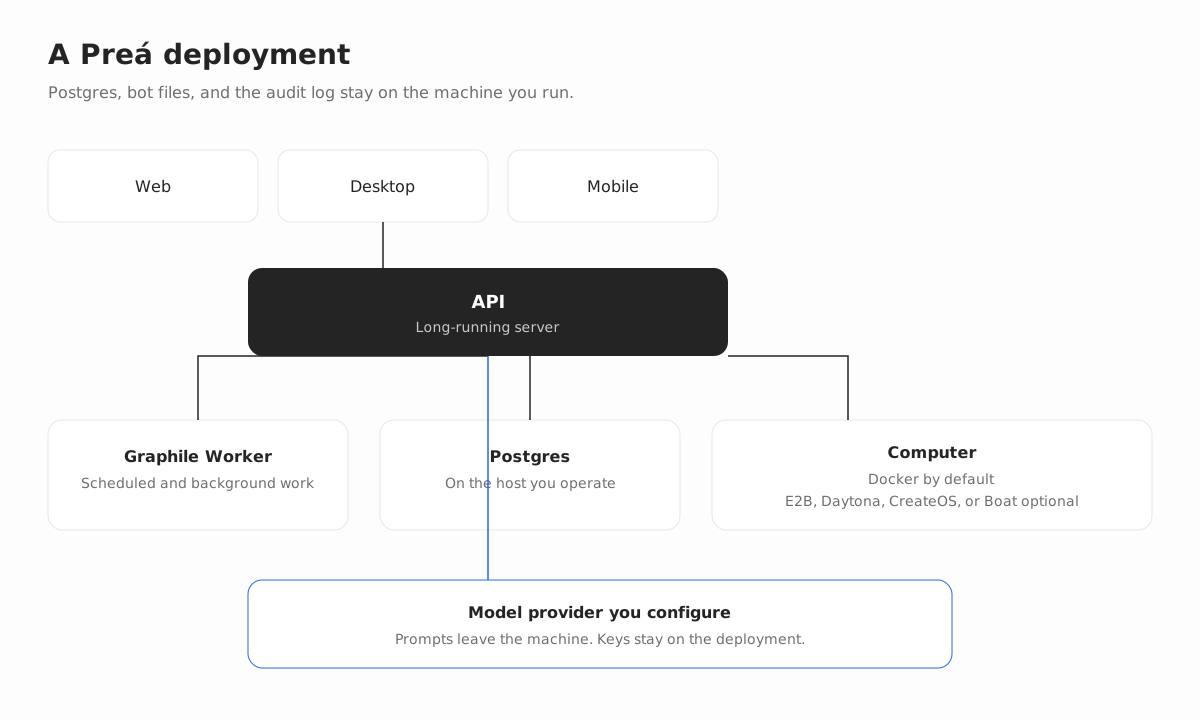
What Preá Installable gives you
Complete data sovereignty
PostgreSQL, agent files, browser profiles, and the audit trail stay entirely on the machine or server you control, protected by per-Space AES-256-GCM envelope encryption.
Model freedom
Connect Orbin Customer Inference, OpenAI, Anthropic, Google, OpenRouter, or Vercel AI Gateway, or point agents at local model servers such as Ollama, LM Studio, llama.cpp, and MLX.
Predictable cost
With Preá Installable Personal or Business, computer minutes and tasks running on your own infrastructure are unlimited by your hardware. Local Docker computers are enabled by default.
Installable-exclusive capabilities
These features run directly on your deployment and are enabled via .env:
- Telegram, WhatsApp, iMessage/SMS, and Feishu/Lark: add your platform credentials (
TELEGRAM_BOT_TOKEN,WHATSAPP_*,SENDBLUE_*, orLARK_*). - Image and video generation:
MEDIA_GENERATION_PROVIDER=fal,MEDIA_GENERATION_API_KEY, and model IDs. - Approved purchases:
PAYMENT_WALLET_PROVIDER=link, waiting for your approval on every transaction. - Ticket board:
TICKET_BOARD_ENABLED=true. - Local models and local MCP servers:
PREA_LOCAL_MODELSandMCP_STDIO_ENABLEDwithMCP_STDIO_ALLOWED_COMMANDS.
Requirements
- Active license key: a Preá Installable Personal or Business subscription (
PREA_LICENSE_KEY). - Runtime environment: Docker Engine 26+ (API 1.45+ for volume subpaths), Docker Compose plugin, curl, and OpenSSL.
Install with official Orbin images
From an empty directory on the machine or server that will run Preá, export your license key and run the official installer:
mkdir -p prea && cd prea &&
export PREA_LICENSE_KEY="prea_lic_sua_chave_aqui" &&
curl -fsSLO https://get.prea.ia.br/install-images.sh &&
bash install-images.sh
Open http://127.0.0.1:5173, create the deployment owner account, and connect your model provider.
Run on a corporate server or VPS
bash install-images.sh --prepare-only
# Edite o .env com PREA_LICENSE_KEY e PREA_HOST, depois:
bash install-images.sh
app.example.com {
reverse_proxy 127.0.0.1:5173
}For air-gapped or restricted corporate networks, see the restricted-network guide and secrets checklist.
Get started
Get your Preá Installable license or start free on Orbin Cloud in Brazil.